


TiviMate IPTV Player
4.0462.00 Reviews
App Specs
- Version
- 5.3.3
- Updated On
- License
- Free
- Downloads
- 5,000,000+
- Developer
- Armobsoft FZE
- Categories
- Video Players & Editors
- Platform
- Android
Screenshots
 Analysis by AppCompare
I judge an IPTV player less by how many channels it can display than by how manageable it makes a long evening of browsing. That is where TiviMate IPTV Player makes its case: it is built around watching live television from a playlist, with an interface intended to make channel lists and programme information easier to navigate. It suits viewers who already have a legitimate IPTV playlist and want a dedicated screen for it, rather than people looking for a service that supplies channels on its own.
That distinction matters before you install anything. A player and a TV service are not the same thing: you need a playlist or compatible provider access to watch content, and the experience depends partly on the quality and organization of that source. I would not choose TiviMate expecting it to find channels for me. I would choose it to make a playlist I already use more comfortable to browse.
How it fits into an IPTV setup
I find it useful to think of TiviMate as the viewing layer between an IPTV playlist and the person holding the remote. In this section, I’ll focus on how that role shapes setup choices, including what to check before settling on a guide layout. Getting those basics right can make later decisions about everyday use much easier.
A focused player, not a channel subscription
TiviMate sits in the video player and editor category, but its purpose is much narrower than a general video app. It is aimed at live IPTV viewing, where the central job is moving between channels and checking what is on. The developer is Armobsoft FZE. The app is free to download, is rated for Everyone, and offers in-app purchases ranging from $0.99 to $33.99 per item.
Its current version is 5.2.0, and it runs on Android 6.0 or later. The app first appeared on December 14, 2018, so this is an established product rather than a brand-new experiment. Its average rating is 4.2 from around 7,400 ratings, with 443 written reviews and more than a million installs. Those figures suggest a sizable audience, though they do not guarantee that a particular playlist, device, or home network will behave perfectly.
The practical question is whether you want a dedicated interface for IPTV or simply need to play occasional video files. For the latter, a broad media player is usually more sensible. For a household that regularly watches live channels through a playlist, TiviMate’s channel-and-guide focus is the more relevant fit.
Getting started and making the guide useful
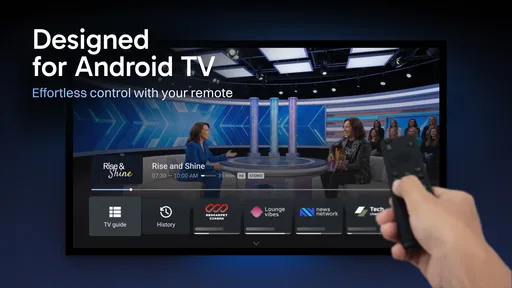
When you first launch TiviMate IPTV Player, you're greeted with a sleek and modern interface. It's like the developers knew exactly what we wanted—a user-friendly experience without the frills. The dark theme is easy on the eyes, and navigating through the app feels as smooth as butter.
Worth Reading Before You Choose

EA SPORTS FC Mobile 26 Is a Bigger Football Game, but It Takes Time

Flipboard Shows What News Apps Must Do Beyond the Feed

Switching to Android Auto Means Rethinking Your Driving Routine

Google Calendar Makes a Crowded Week Easier to Manage

Ludo King Makes the Most of the Minutes Between Plans

Baby Panda World Brings Quick Play to Modern Phones, but Its Game Library Feels Busy
The setup process is a breeze too. If you’ve got your playlist URL handy, you’re good to go. Just pop it in, and the app does the rest. It's like magic, but with fewer rabbits and more TV channels.
In practice, I would have the playlist details ready before sitting down to configure the app. If a household uses more than one source, naming or otherwise keeping track of each source at setup can save confusion later, especially when a guide contains many similar channel names. The useful habit is to check the guide after adding a playlist rather than assuming every programme entry will line up neatly. IPTV channel labels and programme data come from the source, so a polished player cannot correct a badly organized feed by itself.
For a first evening, I would test a few familiar channels and compare the guide’s current programme information with what is actually playing. That small check helps separate a player setup issue from a problem with the playlist or its guide data. It also gives you a quick sense of whether channel navigation feels comfortable on your particular device.
What the guide and viewing tools change
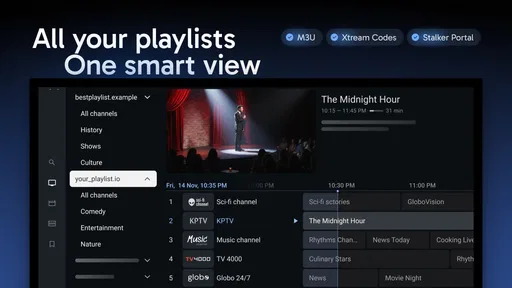
Now, let's talk features because oh boy, does this app have them. The Electronic Program Guide (EPG) is a game-changer. It’s comprehensive and keeps you in the loop about what's on and what's coming next. No more aimless channel surfing!
The guide is most valuable when I use it as a planning tool, not just a prettier channel list. If I have a short window before dinner, I can scan what is on now and what is coming up instead of opening channels one by one. If the guide information is incomplete, though, that convenience naturally falls away; the EPG is only as useful as the programme details available to the player.
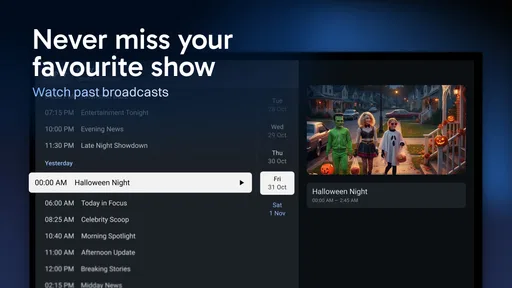
One of my favorite features has to be the catch-up function. Ever miss your favorite show because life got in the way? With TiviMate, you can easily rewind and catch up on what you missed. It’s like having a personal time machine dedicated to your TV needs.
Catch-up is especially handy for a routine that gets interrupted: I might start watching a programme, step away to answer the door, and return to continue from earlier if the channel and playlist support that option. I would treat it as a source-dependent convenience, not a guarantee that every channel has rewindable viewing. Before relying on it for a particular show, I would try it on that channel and learn how its controls behave.
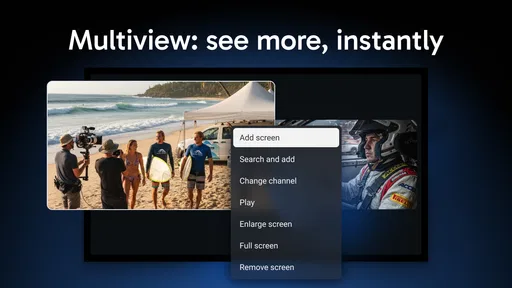
And let's not forget about the multi-view option. Imagine watching several channels at once. Perfect for those of us who can never decide what to watch. It’s a multitasker’s dream come true.
Multi-view makes most sense when I am comparing live coverage, such as keeping an eye on more than one event, rather than as an everyday way to watch a full programme. The trade-off is attention: several simultaneous pictures can make it harder to follow any one of them, and the experience depends on both the device and the streams. I would use it selectively and switch back to one channel when I want to settle in.
Everyday performance, controls, and trade-offs
Performance-wise, TiviMate is pretty solid. The streams load quickly, and I haven't experienced any buffering issues—a major plus. The app is lightweight and doesn't hog your device's resources, which is a blessing if you're running it on a less-than-new gadget.
That said, I would not use one smooth session as proof that all buffering problems come from the app—or that the app can prevent them. Live playback also relies on the playlist, the stream, and the connection between the device and the network. If one channel stalls while others play normally, I would first compare a few channels before changing several settings at once. That simple troubleshooting habit makes it easier to identify whether the trouble follows a particular stream or affects the whole setup.
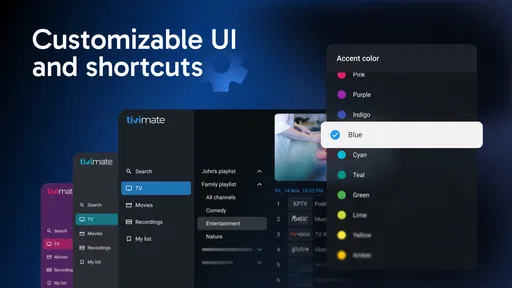
Usability is where this app truly shines. The user interface is intuitive, making it accessible for everyone, even if you're not exactly tech-savvy. Customization options abound, so you can tailor your experience to your liking. Want to change the channel list’s appearance? Go for it. Prefer a different EPG layout? No problemo.
For a shared television, a little restraint with customization can be useful. I would adjust the guide and channel list to make regular viewing easier, then leave the less familiar options alone until there is a reason to change them. A layout that makes sense to one person may slow down another, so it is worth having the main viewer test the setup rather than optimizing it only for the person who installed it.
This is also where TiviMate differs from a basic playlist player. A simpler alternative may be enough if you only open a stream now and then; the appeal here is the guide-oriented experience and the extra ways to browse or watch. On the other hand, a general media player is usually a better match for local video files, while a provider’s own app may be easier for someone who wants a complete service in one place and does not care about customizing an IPTV player.
Who should choose it, and who may prefer another route
I would recommend TiviMate to someone who already watches IPTV regularly, uses an Android device, and wants a more structured way to move through live channels. It is also a reasonable choice for a family television when several people need to browse the same playlist without treating every viewing session like a technical setup task. A guide, channel list, and supported catch-up can be especially useful for viewers whose schedules do not line up neatly with broadcast times.
Picture a normal weeknight: I finish a task later than expected, open the guide to see what is on, and choose a programme without repeatedly hopping between channels. If I have to pause my evening, I can check whether catch-up is available for that channel rather than assuming I have missed the whole show. That is a realistic use of the app’s strengths: it organizes access to a source I already have, but it does not remove the source’s limitations.
I would skip it if I do not have a playlist, mainly watch downloaded films, or want an app that supplies television channels as part of a ready-made service. I would also look elsewhere if I need an iOS-first option; the app is designed primarily for Android, so an iPhone user should choose a player intended for that platform rather than expect the Android experience to carry over.
There is a cost decision too. The download is free, but some features sit behind in-app purchases, with listed items priced from $0.99 to $33.99. I would first decide whether the free experience covers my actual routine, then consider paying only if a locked feature solves a real problem. That is a better approach than buying on the assumption that every household needs the full set of options.
What changes mean for existing users
Because TiviMate has been available since 2018 and is now at version 5.2.0, existing users are dealing with a product that has had time to develop beyond an initial release. That is useful context, but I would separate the confirmed version and release history from any guess about what a future update might bring. A version number alone does not tell me which particular changes matter to my setup.
If you already use an earlier build, the practical test is not whether a newer version sounds more impressive; it is whether your usual playlist, guide, and viewing routine still work as expected after changing versions. I would make note of any personal layout choices before an update and then check the channels and guide information I rely on most. That is a cautious workflow for any player where the viewing source is configured separately.
For someone coming from a simpler player, the main change may be in how much attention the app gives to browsing live television. For a longtime user, the more relevant question is whether the current version remains comfortable on their Android device and with their provider’s playlist. In both cases, the app’s value is best judged through a familiar channel and a normal evening’s use, not by the version number alone.
Limits worth understanding before settling in
Of course, no app is perfect, and there are a few areas where TiviMate could improve. For starters, while the app is free to download, some of the best features are locked behind a premium subscription. It’s worth the investment if you ask me, but I get that not everyone is keen on shelling out extra cash.
Also, it’s primarily designed for Android devices, so iOS users might feel a bit left out. But hey, if you’re rocking an Android box or a Firestick, you’re in luck!
Another limitation is that a capable guide does not make every playlist equally dependable. Channel names, programme details, and the availability of catch-up are tied to the source you connect. If a guide is hard to read or a channel is unreliable, changing the player may not fix the underlying issue. I would check the playlist provider’s own support or try a different legitimate source before blaming the interface.
There is also a difference between having many viewing controls and needing them. Multi-view and detailed guide browsing can be valuable for a regular live-TV viewer, but they may feel unnecessary if I only watch one channel occasionally. In that case, a simpler player can mean less setup and fewer choices to manage. TiviMate is strongest when its dedicated IPTV approach matches a repeated habit.
One practical question is whether a beginner can get started without being an IPTV expert. The setup is approachable if you already have the playlist information, but obtaining and maintaining that source is a separate task. I would start with the details supplied by a legitimate provider, add them carefully, and check a known channel before customizing the rest of the interface.
Another question is whether it is a good choice for watching on a television rather than a phone. Its Android focus makes an Android TV box or other compatible Android device a natural use case, and the interface is designed around browsing channels. Still, the exact comfort of navigation depends on the device and controls you use, so I would test the guide from the couch before committing to a more elaborate setup.
My recommendation after weighing the fit
Overall, TiviMate IPTV Player is a fantastic choice for anyone serious about their IPTV experience. It’s packed with features that make streaming a joy, and its user-friendly design is the cherry on top. Sure, there are a few limitations, but the positives far outweigh the negatives in my book.
If you’re ready to take your TV watching to the next level, give TiviMate a spin. You might just find it’s exactly what you’ve been looking for. Happy streaming!
My recommendation comes with one condition: go in with a playlist you trust and judge the app on the channels you actually watch. If the guide helps you choose faster, the layout feels right on your device, and any paid option solves a genuine need, it can earn a regular place in your setup. If you want a bundle of channels, a universal video library, or iOS support, another kind of app will be a better fit. For the right Android IPTV viewer, TiviMate’s focused approach is its real strength.
Pros
- User-friendly interface enhances navigation.
- Supports multiple playlists for flexibility.
- Catch-up feature for missed shows.
- Customizable channel categories.
- EPG support for an organized guide.
Cons
- Limited features in free version.
- No official support for Apple devices.
- Initial setup can be complex.
- No built-in streaming sources.
- Requires stable internet for smooth playback.
FAQs for TiviMate IPTV Player
What is TiviMate IPTV Player?
TiviMate IPTV Player is a modern and feature-rich IPTV player that allows users to stream live TV channels on their Android devices. It supports multiple playlist formats and offers a user-friendly interface, making it an ideal choice for anyone looking to enjoy IPTV services with ease. Note that it doesn’t provide content; users must have their own IPTV subscription.
Is TiviMate IPTV Player free to use?
TiviMate IPTV Player offers both a free and a premium version. The free version provides basic functionalities, whereas the premium version includes advanced features like catch-up TV, multi-view, and the ability to manage multiple playlists. Users can choose to upgrade to the premium version via an in-app purchase.
Can I use TiviMate IPTV Player on any device?
TiviMate IPTV Player is primarily designed for Android devices, including smartphones and tablets. It is also compatible with Android TV, making it versatile for different setups. However, it is not available for iOS devices, so iPhone and iPad users will need to look for alternative IPTV players.
How do I set up TiviMate IPTV Player?
Setting up TiviMate IPTV Player involves downloading the app from the Google Play Store, installing it on your device, and entering your IPTV service’s playlist URL or M3U link. The app will then load your channels, and you can customize the interface to suit your preferences. Detailed guides are available within the app’s settings.
Does TiviMate IPTV Player support EPG and subtitles?
Yes, TiviMate IPTV Player supports Electronic Program Guide (EPG) and subtitle functionalities. Users can integrate EPG data to view program schedules and enable subtitles for supported channels. These features enhance the viewing experience, providing more control over how content is consumed.


